Posts

Power Automate: Get first item in output
Image
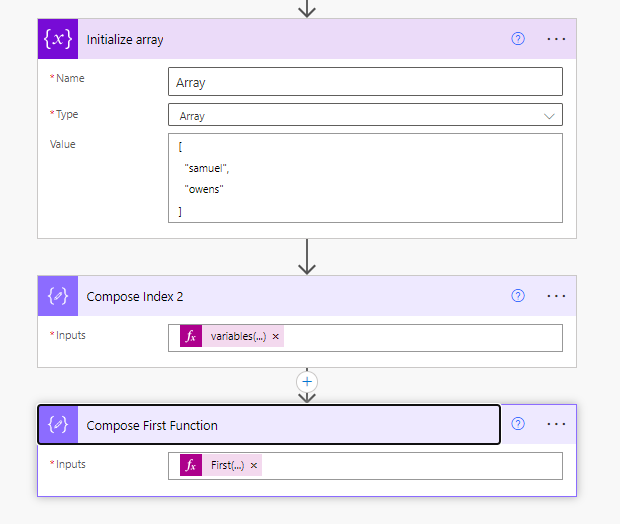
One of the most annoying things about Power Automate for me is when I am trying to use the output of a previous action and as soon as I click that dynamic content button, it pops my new action into a For Each loop. It does this because the previous action could have more than 1 item returned and this would clearly fail unless it was in a loop. But if you have used the Row Count or Top option in the proceeding action, or you know full well that only 1 item will return, it is nice to avoid bloating the flow with an unnecessary loop. There are a couple of way to do this: First function You can craft your filter expression so that the output is wrapped in the First function. This will tell Power Automate to only look at the first item. First(variables('Array')) Calling Index You can edit your filter expression to tell it which item from the source you want. Zero being the first item e.g. variables('Array')[0] Which one to use? I use the index and the main reason is due to...
SharePoint drop box using Power Automate

Image
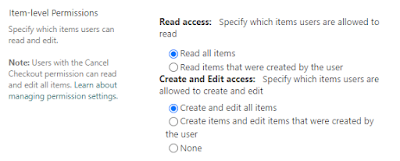
Introduction I was asked how we can create a SharePoint library which allows somebody to upload files to it, but not read any other files in the library. It felt like a simple and pretty reasonable request.  My colleague Grant made me aware of the Enable File Requests feature in SharePoint or OneDrive which might achieve this requirement, but unfortunately as it is designed for more external usage, the pre-reqs require things like Anyone links to be enabled. I looked into other out of the box options. Permissions on SharePoint Lists and SharePoint Document Libraries are similar, but not exactly the same.  I say permissions, I guess it is more advanced settings for Lists have Item-Level Permissions which give the ability for the user to only read items that were created by them. Lists Item-Level Permissions Nothing exists like this in SharePoint document libraries unless you break permission propagation on every file which isn't scalable from a management or performance perspe...

De-selectable radio buttons - Power Apps

Image
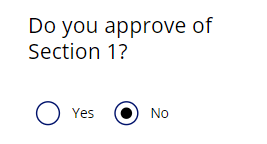
Introduction When creating a Canvas Power App you can choose from a large number of controls and specifically input controls designed to get information from the user. One of these controls is the humble radio button. This is a good control which provides possible options without requiring a user action. In comparison a dropdown would require the user to click to expand all of the possible options. Example radio button input One of problems with this control is the fact you cannot de-select it. Once an option has been chosen, you can change it but you cannot undo it. The post shows a way to make de-selecting possible in a Canvas Power App. One simple way to achieve this is to have a button or icon next to the radio button and its OnSelect property to be Reset(rdoButton). This is easy, but if there are many radio button controls, it could result in lots more controls on a screen or in an app. Power Apps recommends keeping under 500 for an app and 300 maximum per page. The followi...

Assigning Windows 10/11 Enterprise Subscription Activation Licences to Hybrid Azure AD Joined Devices

Image
Introduction Starting with Windows 10, version 1703, Windows 10 Pro supports the Subscription Activation feature, enabling users to “step-up” from Windows 10 Pro to Windows 10 Enterprise automatically if they are subscribed to Windows 10 Enterprise E3 or E5. The Subscription Activation feature eliminates the need to manually deploy Windows 10 Enterprise or Education images on each target device, then later standing up on-prem key management services such as KMS or MAK based activation, entering GVLKs, and subsequently rebooting client devices. It’s important to note that the Windows 10 Enterprise subscription activation is designed to “step-up” a device from Windows 10 Pro to Windows 10 Enterprise. Therefore, your device is required to have a Windows 10 Pro license activated as a baseline. For Windows 10 Enterprise Subscription Activation to function, there a several prerequisites which need to be in place. This blog is aimed for organisations which have Active Directory on premises an...

Implementing OneDrive On A Per User Basis (Not Computer Basis)

Image
Introduction This should provide you with a way to control the switch from Network Folder Redirection to OneDrive KFM backup/sync that is targeted on per user basis rather than OneDrive KFM being attempted for any user logging onto that device subsequently. When it comes to Intune Configuration Profiles or Group Policies, they typical split into user policies (HKCU registry branch) and computer policies (HKLM registry branch).  For implementing policies relating to OneDrive, the settings which relate to the automated set-up of OneDrive login and Known Folder Move are held under computer policies. Those are chiefly: Silently move Windows known folders to OneDrive Silently sign in users to the OneDrive sync app with their Windows credentials Because those settings are set on a computer basis, once those settings are configured on a workstation it will result in OneDrive attempting seamless-sign-on and configuring KFM for any other logins to that device (subject to the accounts being ...

How To Create a Microsoft 365 Developer Tenant in 3 Minutes

Image
This video shows the steps to create a free M365 developer tenant which can be used for your own testing and learning.  The tenant does not expire (so long as you've logged in every 90 days the subscription will continue to renew).  The tenant provides you with 25 Microsoft 365 E5 licenses and you can pre-populate the tenant with dummy users and dummy data if you wish. How to Add Microsoft Defender for Endpoint Subscription As a note, Microsoft Defender for Endpoint isn't available with a Developer Tenant; even though it includes 25 M365 E5 licenses. There is a way around it -  Go to the following URL (in a Dev Tenant browser session) to add the trial as a subscription - https://bit.ly/2YJrTou - you can then enable Defender for Endpoint Trial.  This provided me with a trial that expires in 1 year.  It will be interesting to see whether it renews with the default 'Microsoft 365 E5 Developer' subscription.

Autopilot Hybrid Azure AD Join with Customised First Login Status

Image
Introduction This is my flavour of deploying a customised HAADJ progress status, building on work by Joymalya Basu Roy's detailed article - https://joymalya.com/autopilot-hybrid-azure-ad-join-reworked-with-joy/ . The differences in my version are: Not using Active Setup to run the HAADJ retry process or Splash Screen as I found this didn't work as expected and I didn't want to add a registry item to affect all future logins with a reboot from the HAADJ process. Running the processes under the context of the SYSTEM account, but displaying status to the interactive user. Avoid the HAADJ process running again after the initial success. This provides a customised first login status which prevents the user from using the devices until Hybrid Azure AD Join from the Autopilot process. It's use is primarily for when the User ESP is configured to be skipped. Files This is my version of customised HAADJ which is built on work and guidance in blogs/articles from Michael Niehaus, S...