Posts

Gather SPF Records For Multiple Domain Names

You can use the following script to gather the SPF records for multiple domains.  You just need to populate a TXT file named DomainNames.txt which exists in the same directory.  Below is the PowerShell: $SPFRecords = @ () $Counter = 0 $myDir = Split-Path -Parent $MyInvocation .MyCommand.Path $DomainNames = Get-Content $myDir \DomainNames.txt $SPFOutput = $myDir + "\SPFRecordsResults.csv" ForEach ( $Domain in $DomainNames ) { $Counter ++ Write-Progress -Activity "Querying SPF Records" -Status "Processing $( $ Counter) of $( $ DomainNames.count) " -CurrentOperation $Domain -PercentComplete (( $Counter / $DomainNames .count) * 100) $SPFRecord = Resolve-DNSName -Name $Domain -Type TXT | Where { $_ .Strings -like "*spf1*" } If ( $SPFRecord -ne $NULL ) { ForEach ( $SPF in $SPFRecord ) { $SPFItem = new-object PSObject -Property @ { Domain = $SPF .Name ...
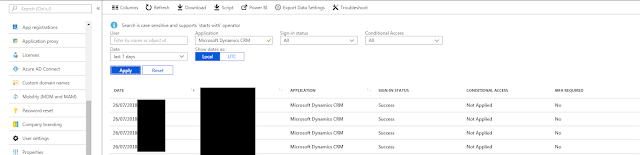
View who has logged into Dynamics 365 - across many environments

Image
A licencing requirement was raised at work this week where we needed to know who out of our Dynamics 365 CRM users were actually using the application.  These licences are really expensive and having many of them unused would cost the company lots of money over the year. We did think of looking at audit tables in CRM, but unfortunately this wasn't an option due to the fact we have many Dynamics 365 environments.  A single licence will allow you access (if you have permission) to access as many sandbox environments as you wish.  This would mean collating data from many environments into one dataset. We needed something more overarching. So I reviewed Azure AD to see if I could view signins for a particular application and low and behold I could see all logins to Dynamics CRM Online.  All we would is visit this page, add the filters and download a CSV file.  The resultant CSV file would then need filtering to remove duplicate users, because we don't care abo...

Batch Printing Tool in PowerShell

Image
As part of my company's recent ERP implementation of Dynamics 365, we found that there was no native solution for mass printing.  This is a crucial for our business as we send a lot of letters out to our customers.  We are trying to shift more towards digital, but there are some communications that have to be sent by post and many of our customers are either not online or prefer post. So, we had to think of how to achieve this.  We had three options Buy an Commercial off the shelf (COTS) product.  It might be limited, but would be supported and be easier to implement. Develop an application in house.  Could be costly and difficult to support but could match all requirements. Have our System Integrator develop an application.  As above, but a lot more expensive. I had the task of bringing these options to life for our Design Group to make a decision on. There were some constraints which made it more difficult e.g. our Printing and Enveloper wasn...

Creating a Complex Custom Azure Role

Image
We recently had the need to create a custom role in the Azure Portal which stopped a set of administrators from creating networks or virtual machines. This was because we are planning to share our ExpressRoute connection with their subscription and we only allow IT to add new devices to our network or domain. Now the standard Azure RBAC roles don't do anything like this.  These roles are typically configured with only a small set of permissions. The role needed the following setup Allow All Allow start, stop, deallocate VM Deny All Compute Deny All Network Deny All Permissions The following article was pretty useful in describing the process of creating the custom role.  There are a few methods, but I opted for the creation of the JSON file. To get the actual permissions required to build the JSON file itself, we needed to run the following commands Get-AzureRMProviderOperation Microsoft.Compute/* Get-AzureRMProviderOperation Microsoft.Ne...

Exchange Hybrid Mailbox Move - Corruption Due To Missing Security Principals (ACL issues) - TooManyBadItemsPermanentException

Image
UPDATE 14 Jan 2020 --------------------- Microsoft have introduced DCS ( Data Consistency Scoring ) which is planned to supersede the Bad Item Limit count you declare on a migration. There are four grades of DCS; Perfect , Good , Investigate and Poor .  You can complete the migration for all grades, except Poor . Importantly, this now means they can now properly differentiate between a corruption in mailbox data and missing permissions or security principal which couldn't be set on the target mailbox. Previously you had to raise the Bad Item Limit to compensate for security principals and genuine corruption combined; this should no longer be the case. For now, DCS will be used by default where you don't set a Bad Item Count. If you do specify a Bad Item Count, DCS will not be used See the below links for more details: https://techcommunity.microsoft.com/t5/exchange-team-blog/improving-migrations-using-data-consistency-scoring/ba-p/1105920 https://docs.microsoft.c...

Exchange Back Pressure and Safety Net

The following article covers a scenario where 2 Exchange 2013 servers were in the same Active Directory site. There is no DAG in place and the Safety Net settings had the default configuration. Issue:  A receive connector was set-up on ExchangeSrv#1 to allow relays from 3rd party of line of business applications. ExchangeSrv#1 had plenty of space, not low on resources and was not in a back pressure condition. A 3rd party system was in place and submitting emails using Telnet. The majority of emails being submitted were being rejected with the error "453 4.3.1 Insufficient system resources". ExchangeSrv#2, did not have the same receive connector configured and was not accepting emails from the 3rd party system. It did however have little of no disk space left on the C:\ drive which also hosted the transport queue file. In the event viewer ExchangeSrv#2 was in back pressure. It was discovered that multiple IIS logs files were consuming space on the C:\ drive of Ex...

Creating Users in Azure SQL

Image
I have been working quite a lot in Azure recently and have done some work with SQL Azure PaaS databases. I am not an SQL DBA by any stretch of the imagination, so some tasks have taken a bit of Googling to conquer! There are some key differences between a full SQL install and Azure SQL .  One of the main differences with Azure SQL Azure PaaS databases is that you need to do so much more through Transact-SQL.  My limited experience of SQL has all been based through GUI prompts, so this initially proved a problem for me. One of the tasks which I have had to complete a fair amount recently is to create database users.  In the Azure Portal you can create administrator accounts for the whole server, but this doesn't match the requirements of the business in most occasions. I came across these blog posts on the Microsoft website https://azure.microsoft.com/en-us/blog/adding-users-to-your-sql-azure-database https://docs.microsoft.com/en-us/azure/sql-database/sql-datab...