Posts

Exchange Free/Busy Calendar Sharing

Image
Recently we had a request to be able to share calendar with an external organisation that we are working on a project with.  In the old days of Exchange, the only way of achieving this in a seamless way was to setup trusts or use things IIRU and IIFP. Since Exchange 2010, Microsoft have introduced the Microsoft Federation Gateway.  This allows companies to setup a trust to Microsoft which can be used to gain scheduling information with a third parties once policies have been configured on both parties Exchange environment. https://technet.microsoft.com/en-us/library/dd335198(v=exchg.141).aspx This looked like a pretty straight forward task and certainly a LOT easier than setting up direct trusts or sharing keys.  Unfortunately it wasn't quite that straight forward. These were the Issues we ran into and the relevant fix. 1.   Cannot create Organisational Relationship for third party. Also when running get-federationinformation Powershell cmdlet, it errors. ...

Cannot add certificate to Netscaler

Image
Recently I blew the dust off my lab environment and decided to look into configuring ADFS proxy through Netscaler.  The first task of this install is to install a publicly trusted SSL certificate on the Netscaler. Once I created a CSR and got it signed by my CA I was ready with the files I needed, namely A PFX file (private key which is used to decrypt SSL traffic on the Netscaler) CA bunlde (files which are used to encrypt traffic and for clients to decide whether to trust their connection to me) When importing the files onto the Netscaler, I kept getting the following error message. "Invalid private key, or PEM pass phrase required for this private key" Quick Google search reveals an old CTX article . The resolution is to export the private key to a new file on the shell of the Netscaler.  This didn't really satisfy my curiosity as to why this error was occurring. After a bit more Googling I found the following CTX.  How to Convert PFX Certi...

Output SMS from Powershell (RedOxygen)

Image
I have been completing some investigatory work around SMS gateways recently, specifically for our new contact centre suite to contact our customers. I came across a SaaS based gateway product called RedOxygen .  They have a number of methods of sending SMS messages, ranging from an Office plugin, to a documented API. My interest was the latter option as this is what we plan to use.  You can sign up for a free account which gives you 25 free messages (very useful for testing).  There is an interface option for HTTP GET and POST to send your messages which is easy to combine with lots of programming/scripting languages. I am not a programmer or developer but I have worked with Powershell before, so I set myself the challenge of creating a little GUI which will take input from a user to type a telephone number and a message which upon hitting a button, would send the message to a mobile phone.  I also wanted it to display a return result to inform the us...

Workspace Control doesn't work

Image
Workspace control is a feature of Citrix where users are able to seamlessly reconnect to their active or disconnected sessions from other devices.  It is part of a wider feature set called Smooth Roaming which has been part of ICA for a number of years. Recently I found that our production Citrix Access Gateway environment stopped supporting Workspace Control.  Users who became disconnected from their desktop session were unable to reconnect to that same session because it was "active" between the CAG and the XenApp box.  It meant that admins had to disconnect the session and on next desktop launch it would reconnect. The other thing to note is that Citrix built a couple of buttons to handle these actions manually.  They showed underneath the Logon button in Web Interface. Broken! Fixed! These buttons only show up in Internet Explorer and if the WI site is in Trusted Sites or the specific setting you need to DISABLE is "Only allow approved domains t...

Preparation for Azure lab

Image
Recently I have been completing some test work with Azure, Azure AD and ADFS.  In the next week or two I will be doing some work with the Enterprise Mobility Suite (Intune for MDM, Azure AD Premium and Azure Rights Management). Hopefully I will be able to blog some random information from my experiences, but this post is to identify potential speed bumps before you attempt to use Azure, Azure AD and ADFS. Money/MSDN Using Azure virtual machines and storage costs money.  When you sign up you must provide valid credit card information.  You are given a £125 trial for a month, but after that it will cost you.  You can configure spend limits which will stop surprise bills being racked up each month. If you have a Visual Studio or MSDN subscription you actually get free credits.  I have a Visual Studio Ultimate Subscription through my work so I get £95 a month to spend in Azure (which is plenty for labs). MSDN Credits Make sure you turn off your Cloud ...

Citrix User Group - London - 2015

Image
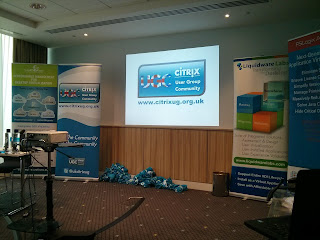
The event was held at the Novotel on Blackfriars Road in London. Unbeknown to me it was the 13th session in the UK (my first).   The announcement of the Citrix User Group Community at Synergy made me more aware of these events. So how was the day? Well it was bloody good fun, unusual for these types of events. Lots of jokes, a few swears but crucially some really interesting technical information. -------------------- News & Synergy Update Neil Spellings Firstly Neil ran a news update session which covered the Eliot group shareholders analysis of Citrix's business strategy. Forbes article He also covered some high level Citrix news including Xenserver 6.5 sp1 release, acquisition of telephony provider Grasshopper and resurrection of the cloud.com domain which Citrix purchased some years ago for Citrix Workspace Cloud. He also showed that Citrix and Xenmobile specifically is in top quadrant for EMM. Neil followed up with a whistle stop tour of Synergy h...

Add File Extensons via Powershell

Image
We are using an extraction tool to export data from one of our business applications in preparation to switching to our ERP solution. Unfortunately this tool doesn't add the file extensions to the exported files! So I needed to create a powershell script to do the job for us. As with most things there is no point reinventing the wheel.  I did a google search and found this useful blog post. http://blogs.msdn.com/b/dan_fay/archive/2012/09/17/rename-file-extension-with-powershell.aspx The script was pretty much there, but I needed to tweak it slightly.  I added a line which asks the user which file extension they want to use.  I also changed it so that it would only change files which currently have no file extensions configured. What users are presented with The result is as follows $extractedfiles = Get-ChildItem | Where-Object {$_.Extension -eq ""} $fileext = read-host "what file extension?" ForEach ($file in $extractedfiles) { $filenew = $file....